
The Premise#
This isn't an OpenHAB tutorial. If you're running it, you know the drill: items, things, rules. If like me you've been running OpenHAB for a while, these are all text files - perfect for an LLM to consume and edit. I've been doing just that, managing my config in VSCode with Github Copilot.
After experimenting with OpenClaw now for a while - I wondered.. Could I, safely (!) have OpenClaw edit my configs and update the live running service?
The Setup#
The key here is safely right? Last thing I needed was a rougue LLM breaking the house. Very low wife approval factor! If you're not already, you're going to need your OpenHAB config directory all in a private repository. On my Ubuntu host, that mean everything in /etc/openhab is committed to a repo. Anytime I do a change, a new commit. Easy rollback.
From this basis, going to fully agentic configuration management was actually fairly simple.
Add a new sub-agent: In OpenClaw, tell your claw to create a new dedicated agent. I called mine 'homie'. Do as ou see fit. This helps manage context for the agent, making sure anytime you chat with it, it stays on task. Setup your chat channels like you normally would. There's plenty of OpenClaw tutorials if you need help with this.
Checkout your OpenHAB repo: Tell your new agent to checkout your OpenHAB Github repo. If you've not connected it to GitHub already, you may need to setup access keys. I've given my OpenClaw it's own email address and GitHub user so I can invite it to my repositories selectively. Again - let's act safely (well, as safe as possible). If you've made it this far, you can now chat to your OpenClaw, it can see your config and make meaningful changes to your environment. The changes are still in your OpenClaw's workspace though, nothing has changed in OpenHAB.
Giving OpenClaw access to OpenHAB: I run my OpenHAB server on an Ubuntu VM. It's seperate from OpenClaw, but only an SSH login away. Again, with safety in mind, I created a sandboxed
openhab-agentuser on the OpenHAB VM, locked down viasudoers. It can run exactly three things: a deploy script,systemctl restart/status, and log tailing. If it goes rogue, the blast radius is incredibly tight.
Doing it yourself#
I would have usually created a tutorial for this - but if you're using OpenClaw, Claude Code and other LLMs (and who isn't), your environment is going to be different from mine anyway. You can just ask your AI buddy to explain it to you :)
I have created a Skill that does most of the heavy lifting though. Point your Claw at it, fill in your repo and SSH details, and you're off. You can grab it here:
I also had Claude Code build a CLI-wrapper for the OpenHAB REST API. Whether you're doing this OpenClaw setup or some other AI agent approach, it's a good repeatable way to query your OH instance from inside your network. You can find it at openhab-rest-cli
and it's published on npm so you can run it via npx openhab-rest-cli.
The Workflow#
The skill enforces a simple loop: Edit → Approve → Deploy → Verify. Homie doesn't just YOLO changes into my house - it always stops for me to eyeball the diff before anything leaves the workspace.
Let's look at a real bug. My backyard light automation was triggering on both the open and close of the rear door. Annoying, but not annoying enough to fire up VS Code on a weekend.
So I sent one chat message to Homie.
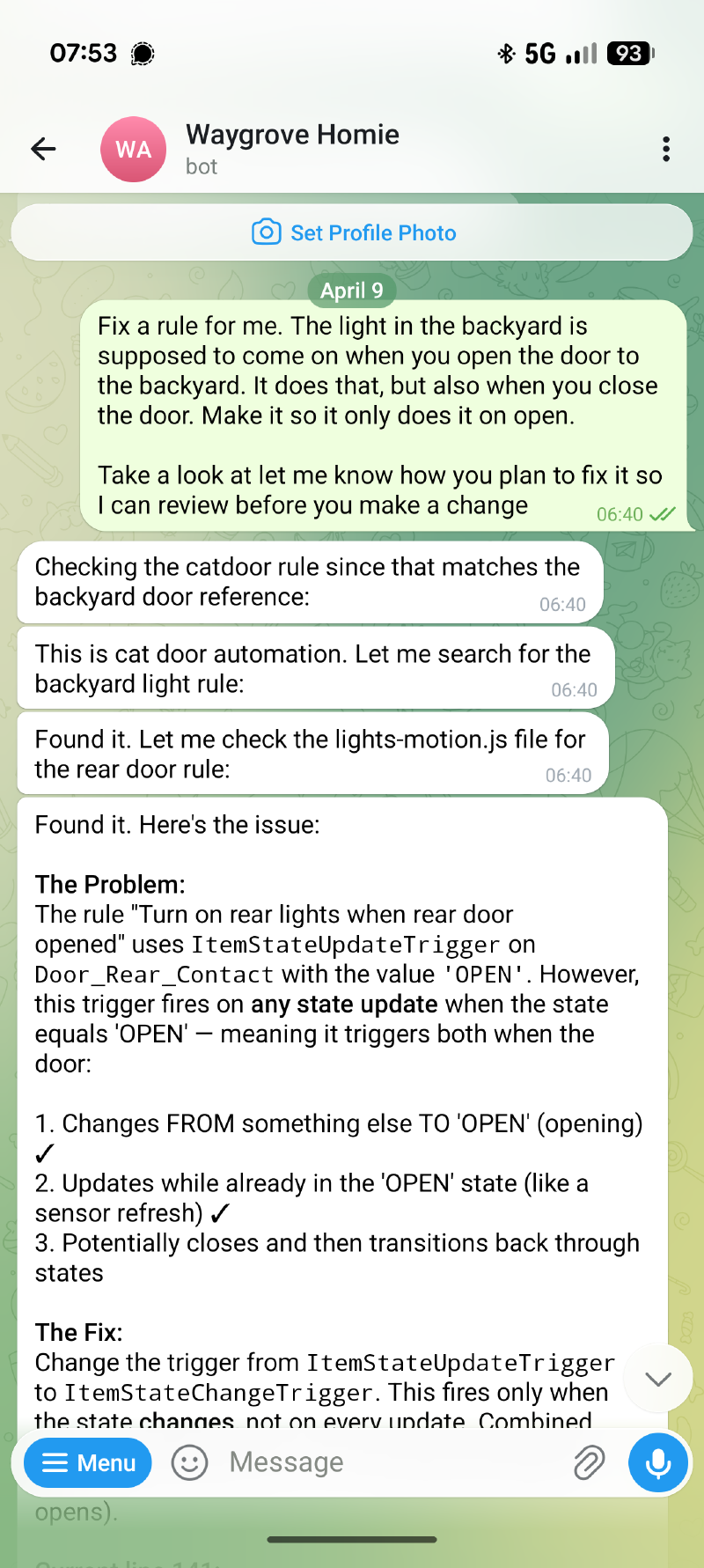
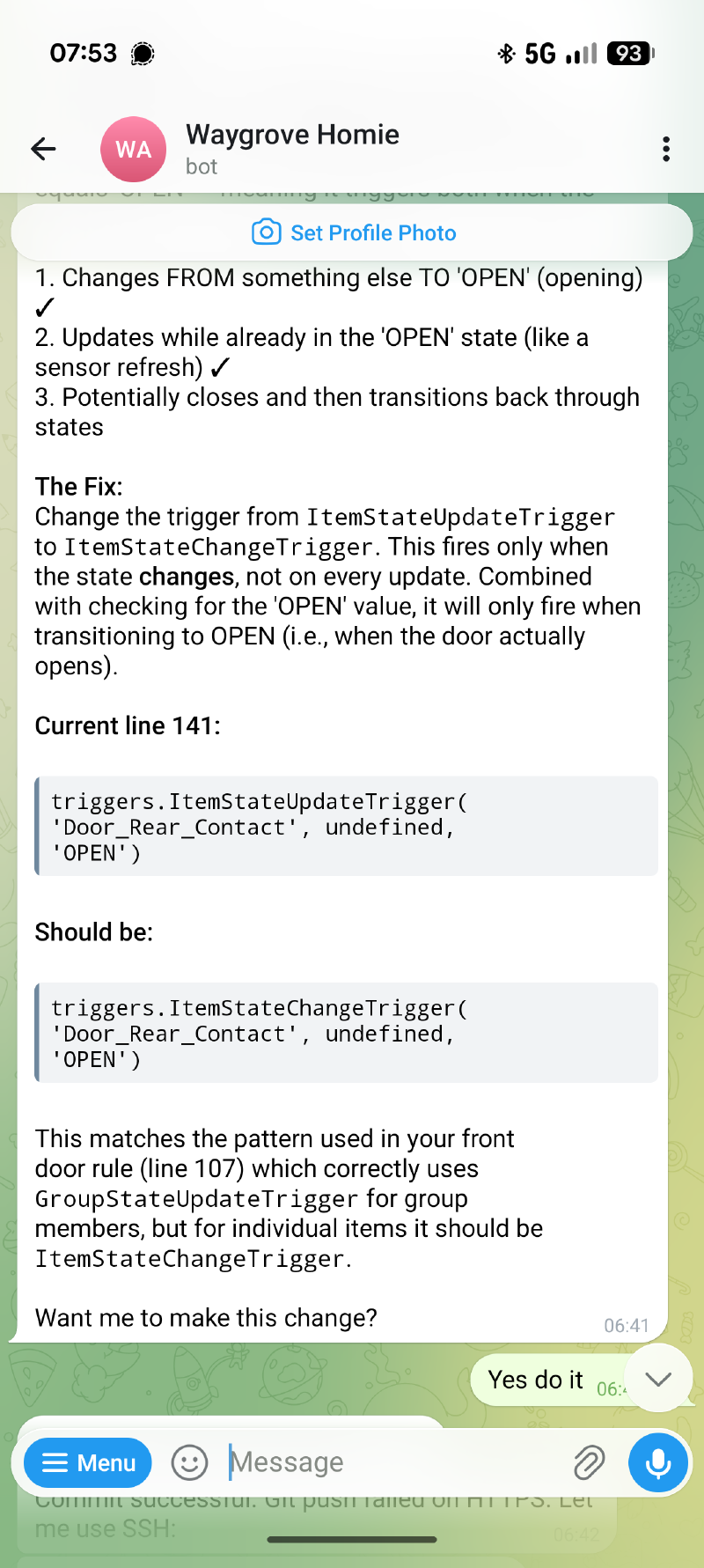
Here is exactly what happened next:
- Edit: Homie read the
lights-motion.jsrule file from its local repo clone, found the bug, and edited the file. The fix was changingItemStateUpdateTriggertoItemStateChangeTrigger- one line. - Approve: It showed me the diff on Telegram and waited. No approval, no deploy.
- Deploy: Once I gave the nod, it committed, pushed, SSH'd into the OpenHAB VM via the sandboxed
openhab-agentuser, and ran the deploy script (which does agit pulland refreshes the config). - Verify: It tailed the OpenHAB logs for a few seconds to confirm the rule loaded cleanly, then optionally hit the REST API via
openhab-rest-clito check state. - It replied to me: done.
The whole thing from message to fix-in-production took about a minute, all from my phone on the couch.
Why This Is Different#
GitHub Copilot and Claude Code are fantastic, but you still need to be at a desk, in an IDE, with the repo open, and you have to manually deploy.
With this setup, I had my phone in hand. The deploy happened immediately. The AI knows the codebase because it has the repo, access to the docs and it knows the live state because it has the REST API.
Ok, this isn't rocket science - but I see posts all the time "what is OpenClaw even for, I could do this with Claude Code", and they're not wrong. But I want to get away from the desk & keyboard and still be able to manage my OpenHAB instance, especially for small tweaks here and there. Big refectors I'm still going to use Claude or Github Copilot, but these are unusual in my fairly mature Home Automation setup. So far, this is a great addition that doesn't break things catastropically even if the AI-overlord goes off the rails :)
Try It#
The two pieces that make this work are both public:
The CLI is also on npm as openhab-rest-cli if you just want to poke at your OpenHAB instance from a terminal.